AutoSoftWay logo AutoSoftWay

πŸš— Integration Β· CARFAX Β· Vehicle History

CARFAX reports, built right into AutoSoftWay

Retrieve complete CARFAX vehicle history reports directly from work orders and client profiles β€” no separate logins, no manual lookups. Full vehicle insights where you need them, the moment you need them.

CARFAX + AutoSoftWay

Integrating CARFAX with AutoSoftWay

The CARFAX integration is built directly into AutoSoftWay for auto shops. Once enabled in your settings, your team can retrieve complete vehicle history reports from any work order or client profile β€” instantly.

The CARFAX integration must be explicitly enabled in your AutoSoftWay settings β€” a one-time setup.
Once configured, retrieve full CARFAX vehicle history reports for any vehicle in your system.
AutoSoftWay automatically pushes your repair report details to CARFAX daily at 1:00 AM β€” a valid VIN is required.
Builds trust with clients by providing verified, data-backed vehicle history during every service visit.
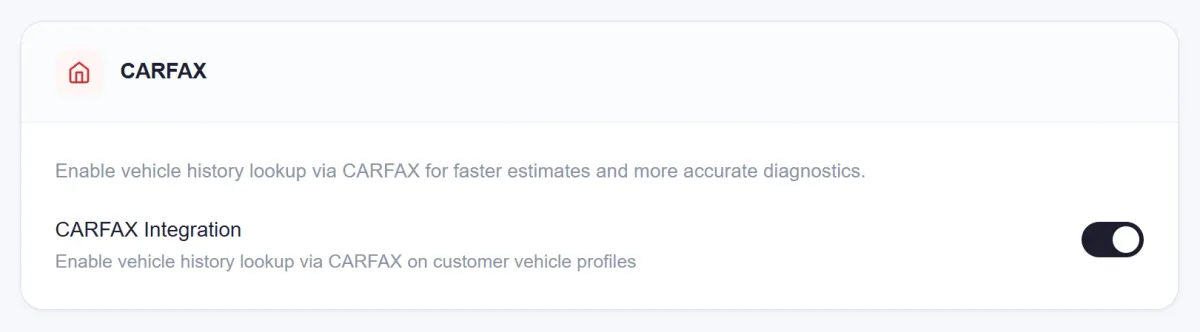
AutoSoftWay settings card with the CARFAX Integration switch turned on to enable vehicle history lookup on customer vehicle profiles
Turn on the CARFAX integration once in Settings
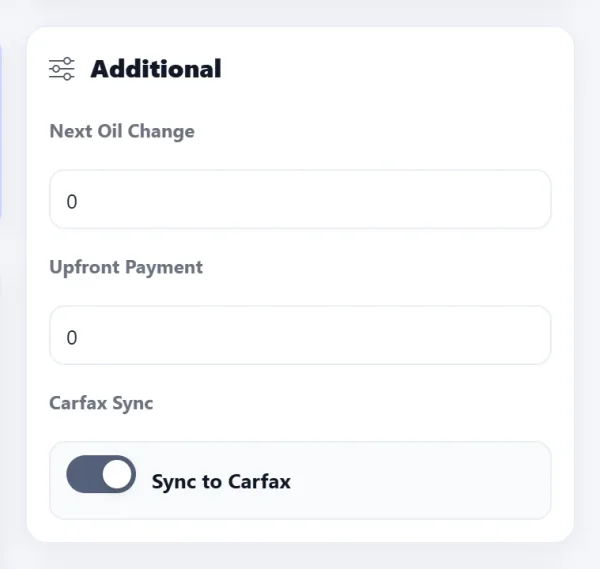
Sync to Carfax switch in the Additional panel of an AutoSoftWay order
Each order has a Sync to Carfax switch
Work Orders Integration

CARFAX reports, directly from your Work Orders

The CARFAX integration is seamlessly embedded in AutoSoftWay work orders β€” a few clicks is all it takes to pull a full vehicle history report for any job on your floor.

CARFAX reports can be accessed directly from the Work Orders β€” no separate logins needed.
The process is simple and streamlined, requiring just a few clicks to pull a complete report.
AutoSoftWay automatically adds your repair report details to CARFAX β€” just activate the integration in settings.
Daily sync at 1:00 AM automatically pushes all estimates. A valid VIN is required for successful data transfer.
Vehicle Insights & Trust

Trusted vehicle history for every car in your shop

CARFAX delivers the vehicle information your team needs to make smarter repair decisions β€” and gives your clients the transparency they deserve.
Access essential vehicle information including service records, ownership history, and title status for more informed repair decisions.
Spot accidents, odometer discrepancies, and title issues before work begins β€” protecting your shop and your clients.
Enhance transparency and build trust with your clients by offering verified, CARFAX-backed vehicle history at every visit.
Your own repair work is added to CARFAX automatically β€” every job your shop completes becomes part of the official record.
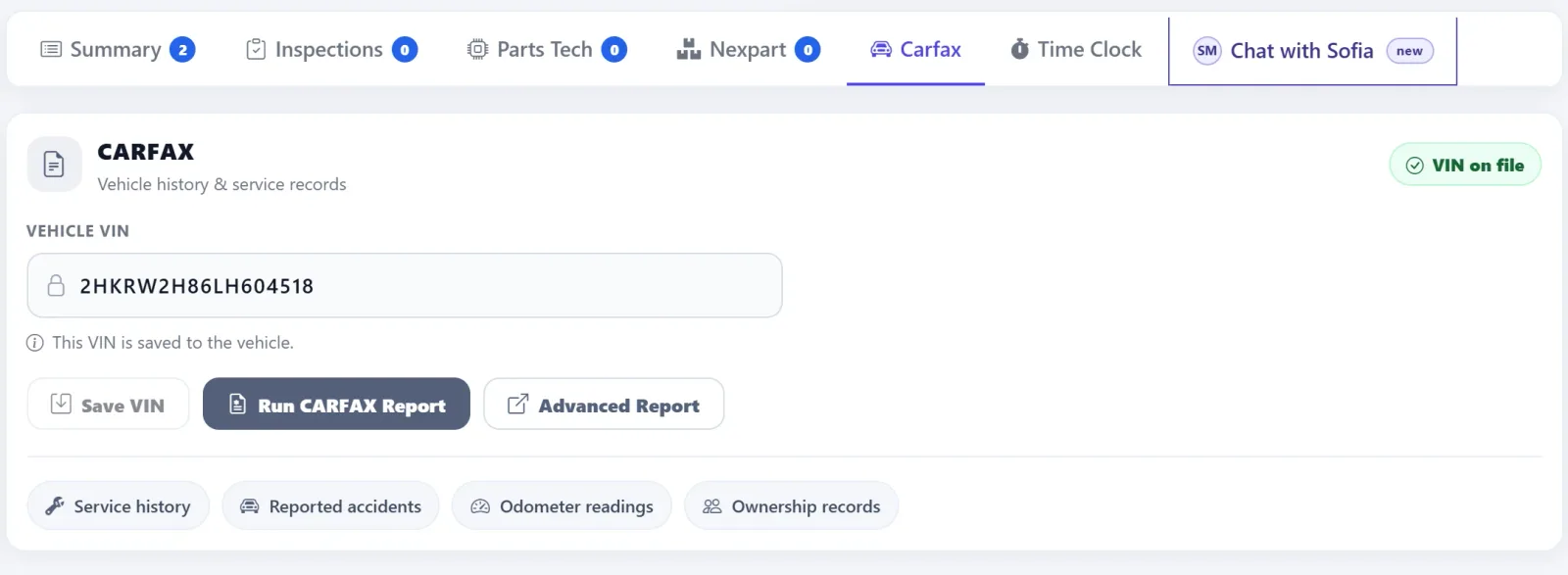
CARFAX tab on an AutoSoftWay repair order with the vehicle VIN on file, Run CARFAX Report and Advanced Report buttons, and shortcuts for service history, reported accidents, odometer readings and ownership records
Run a CARFAX report right from the order β€” the VIN is already on file
Why It Matters

Everything your shop gets with CARFAX inside AutoSoftWay

Instant Plate Search

Run license plate searches directly from any Client profile or Vehicle section β€” automatically retrieve complete vehicle details with no manual data entry.

Full Report Access from Work Orders

Pull a complete CARFAX report in a few clicks directly from any open work order β€” service history, accidents, ownership, and title status all in one view.

Automatic Daily Sync

AutoSoftWay pushes your repair and estimate data to CARFAX every night at 1:00 AM β€” keeping the vehicle’s official record up to date automatically.

Title & Ownership Verification

Instantly check title status, ownership count, and usage history before any work begins β€” protecting your shop and giving clients confidence.

Build Client Trust

Sharing verified CARFAX history with clients at every visit demonstrates transparency and professionalism β€” increasing trust and repeat business.

Simple One-Time Setup

Enable the CARFAX integration once in your AutoSoftWay settings and everything is ready. No complicated configuration β€” just instant access from that point on.

FAQ

Common questions about CARFAX integration

How do I enable the CARFAX integration?
The CARFAX integration must be explicitly enabled within your AutoSoftWay account settings. Once activated, you’ll have full access to retrieve vehicle history reports from any work order or client profile. Contact AutoSoftWay support for help with setup if needed.
Can I search by license plate instead of VIN?
Yes. AutoSoftWay lets you run license plate searches directly from the Client profile’s Vehicle section. CARFAX automatically retrieves the complete vehicle details β€” including VIN, make, model, year, and odometer β€” saving time on manual data entry.
Does AutoSoftWay send my repair data to CARFAX automatically?
Yes. Once CARFAX integration is activated in your settings, AutoSoftWay automatically syncs with CARFAX daily at 1:00 AM, pushing all your repair and estimate data. A valid VIN number must be entered on the work order for the data transfer to succeed.
What information does a CARFAX report show?
CARFAX reports include essential vehicle history such as service records, ownership history, title status, accident records, and odometer readings. This gives your team the context needed for more informed repair decisions and builds transparency with your clients.
Is CARFAX access available on all AutoSoftWay plans?
CARFAX integration availability may vary by plan. Contact AutoSoftWay support or request a demo to confirm which plans include CARFAX access and get the integration set up for your shop.
CARFAX + AutoSoftWay

Know every vehicle’s history. Before you touch the first bolt.

Retrieve CARFAX reports from work orders, search by plate, and automatically push your repair data back to CARFAX β€” all inside AutoSoftWay.