


-
Labor = hours × rate
Add a line for each repair with its hours. Each line is priced at your labor rate.
-
Parts with markup
Enter the parts cost and your markup to get the price the customer pays.
-
Tax on top
Add your sales tax rate and the calculator shows the repair estimate total.
The formula
How to calculate a repair estimate
- Labor = labor hours × labor rate, for each repair on the estimate.
- Parts = parts cost + your markup.
- Fees = any shop fees you charge on the job.
- Tax = sales tax on what is taxable where you are.
- Total = labor + parts + fees + tax.
About free labor guides
The hours are the hard part
A labor calculator is only as good as the hours you type in. Professional book times — like MOTOR’s — are licensed data, which is why a truly free labor guide is hard to find. In AutoSoftWay the Labor Guides add-on looks them up for the exact vehicle and puts them on the estimate for you.
Skip the calculator
Book hours from MOTOR, straight onto the estimate
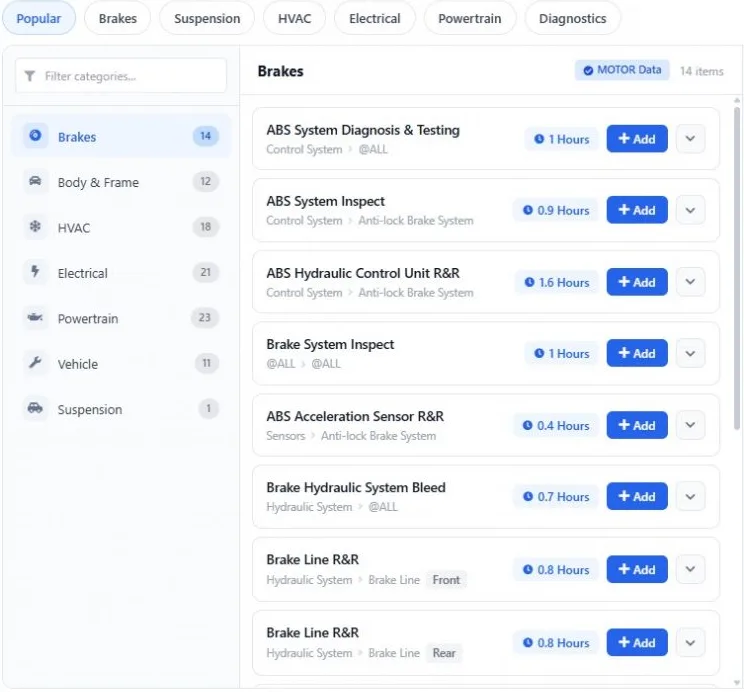
In AutoSoftWay you don’t look up the hours somewhere else and type them in. Open the labor guide on the estimate, pick the operations and their MOTOR book times are added for you.
- VIN or Year / Make / Model lookup
- MOTOR hours on every operation
- Labor Guides add-on $50 USD/month
Priced automatically
Your labor rate on every line
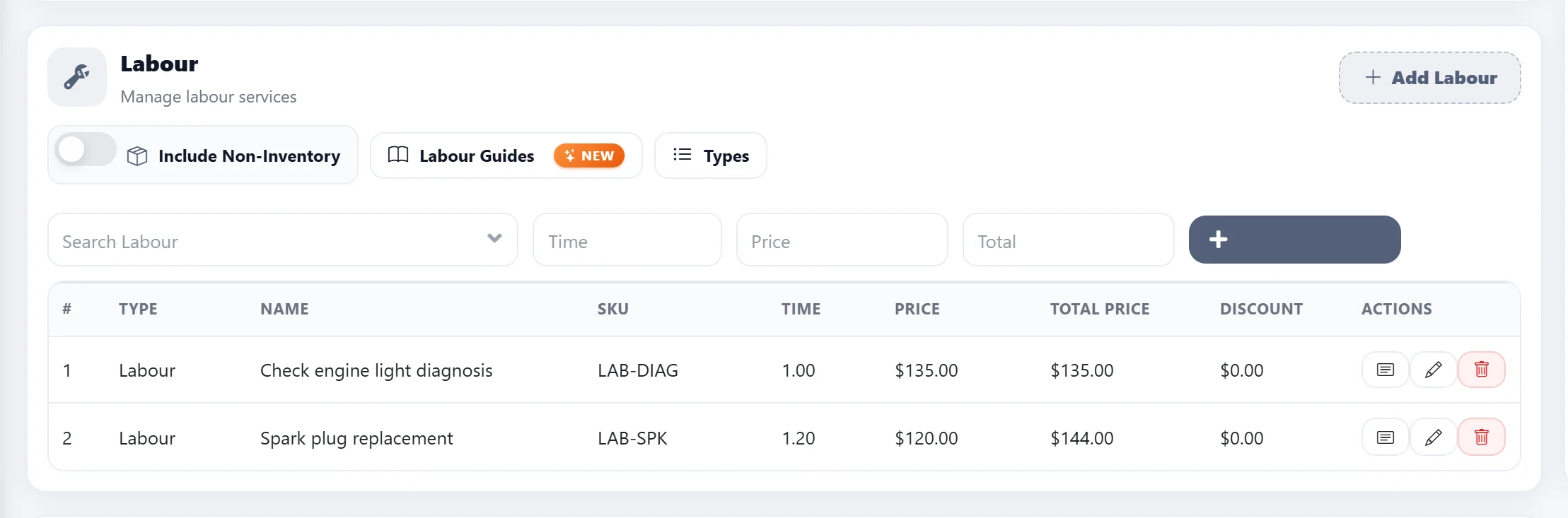
The estimate multiplies the hours by the labor rate from your Settings, adds the parts and taxes, and keeps the same lines through the work order and the invoice.
- Labor rate set once in Settings
- Edit hours or price on any line
- Send the estimate for approval
Get started
From labor calculator to real repair estimates
- 1
Start your AutoSoftWay trial
10 days free, no charge during the trial — estimates, work orders and invoices included.
- 2
Set your labor rate
Enter your labor rate once in Settings and every labor line on the estimate is priced with it.
- 3
Add book hours from MOTOR
Turn on Labor Guides ($50 USD/month) and add MOTOR labor times to any estimate in one click.
Questions
How do I calculate labor cost for a car repair?
Multiply the labor hours for the job by the shop’s hourly labor rate. Then add the parts (cost plus markup), any shop fees, and the sales tax to get the repair estimate total — the calculator above does exactly that.
Where do the labor hours come from?
Most shops use the book time from a labor guide: the standard hours for that repair on that vehicle. In AutoSoftWay the Labor Guides add-on looks them up from MOTOR by VIN or Year / Make / Model.
Is there a free labor guide?
This labor calculator is free. Professional book times like MOTOR’s are licensed data, so they are not free — in AutoSoftWay they come with the Labor Guides add-on ($50 USD/month, included in Enterprise once the plan is paid).
Does the calculator save or send my numbers?
No. It runs entirely in your browser — nothing you type is saved or sent anywhere.
Should labor be taxed?
It depends on where your shop is: some places tax labor and some only tax parts. Use the “Tax labor” switch to match your local rules, and check with your accountant.
Can AutoSoftWay do this on every estimate?
Yes. AutoSoftWay prices every labor line at your labor rate, adds parts and taxes, and turns the estimate into a work order and an invoice without retyping.