AutoSoftWay logo AutoSoftWay

πŸ€– AI-Powered Feature

Book appointments with the power of AI

Just describe the appointment in plain English β€” AutoSoftWay’s AI fills in the client details, sets the time, and sends automated reminders automatically. πŸ—“οΈ

πŸ€– AI-Powered Parsing
πŸ“± Auto SMS Reminders
πŸ—“οΈ Walk-In & Web Booking
⚑ Instant Client Profiles
πŸͺ 3,000+ Auto Shops
What AI Booking Does

Everything handled β€” before the customer even walks in

AutoSoftWay simplifies scheduling: book appointments with the power of AI, which turns a simple description into a fully scheduled appointment with client profile, technician, and automated messages β€” in seconds.

πŸ€–
AI Appointment Parsing
Just type or speak the appointment details in plain English. AI extracts the client name, phone, time, and service automatically.
πŸ‘€
Instant Client Profiles
New walk-in? No problem. A full client profile is created automatically β€” no manual data entry required from your staff.
πŸ’¬
AI-Generated Messages
Reminder and follow-up SMS messages are written by AI and sent automatically β€” keeping customers informed without lifting a finger.
🌐
Web & Walk-In Booking
Accept bookings from your website or directly at the counter. Both flows sync to the same calendar in real time.
πŸ”§
Technician Assignment
Assign jobs to the right technician directly from the booking screen. Everyone stays organized with their own calendar view.
πŸ“Š
Appointment Dashboard
View all appointments by day, week, or month. See pending, confirmed, and completed jobs at a glance β€” no surprises.
How It Works

From description to booked appointment in 3 steps

No complex forms. No back-and-forth. Just tell the AI what you need and it handles the rest.
1
Describe the appointment πŸ—£οΈ
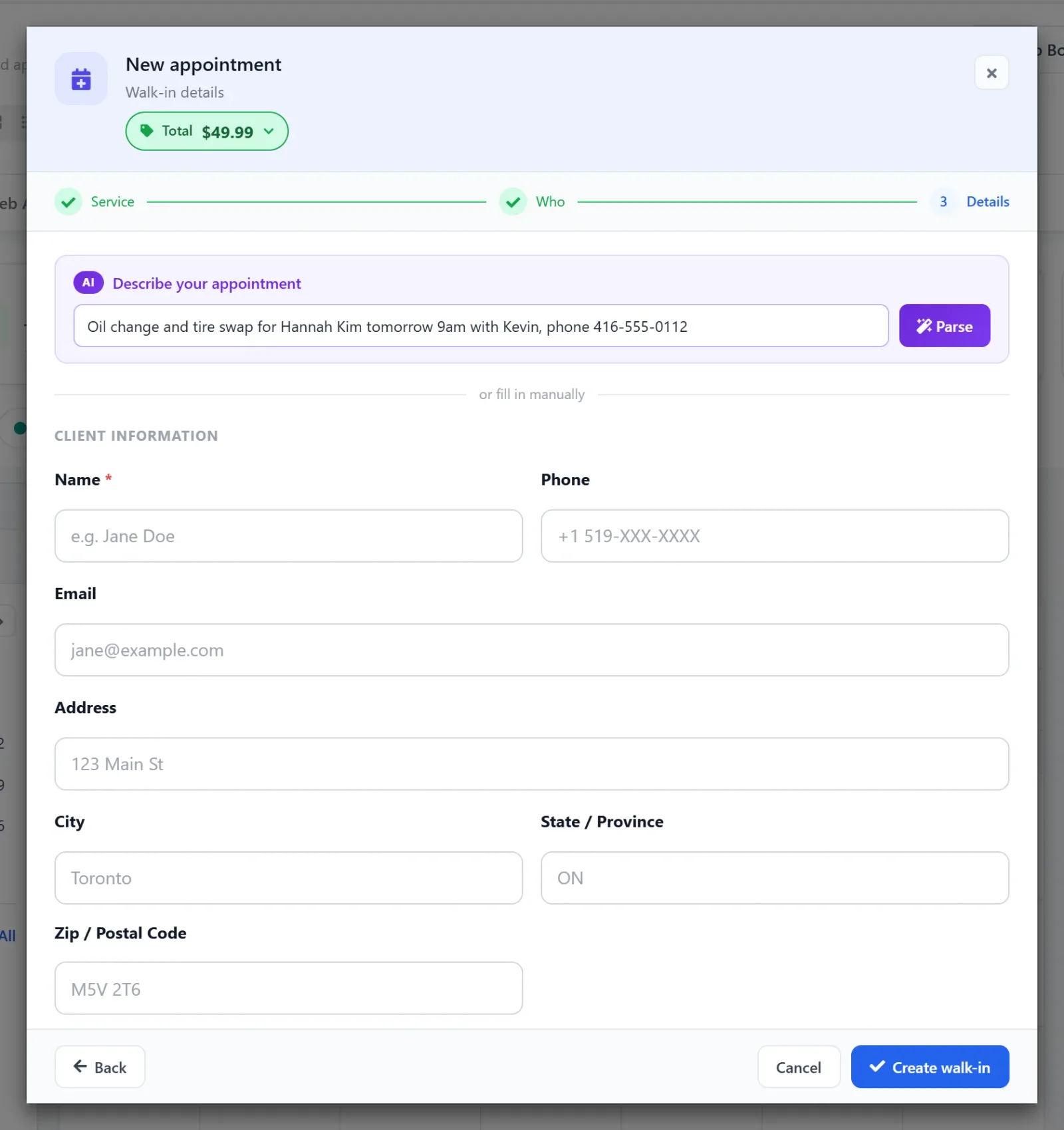
Type a sentence like β€œOil change for Sarah on Friday at 10am, her number is 416-222-3333.” That’s all you need to do.
2
AI fills in all the details ⚑
AutoSoftWay instantly extracts the client name, phone number, service type, technician, date and time β€” and pre-fills the form for you.
3
Confirm & reminders go out automatically βœ…
Hit β€œCreate Walk-In” and the customer receives an AI-written reminder 2 hours before β€” and a follow-up message 1 hour after their appointment.
AutoSoftWay New appointment walk-in step with the AI "Describe your appointment" box filled in with "Oil change and tire swap for Hannah Kim tomorrow 9am with Kevin, phone 416-555-0112" next to the Parse button, above the manual client fields
Step 1 in the app: type the appointment in plain English, then click Parse.
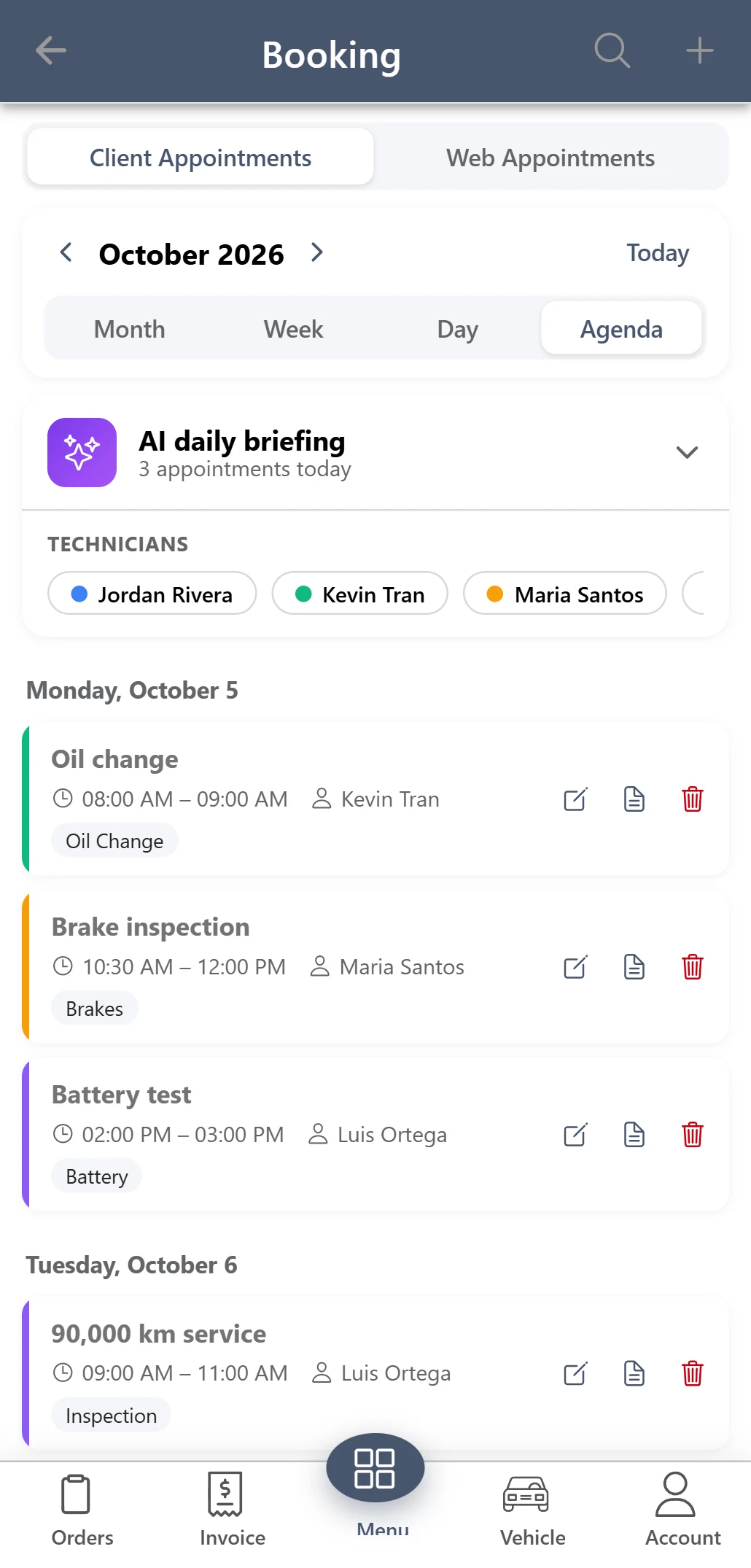
AutoSoftWay Android app: Booking calendar with technician filters and the AI daily briefing
The same work in the AutoSoftWay app on Android and iPhone.
Real Reviews

Shop owners love AutoSoftWay ❀️

Verified reviews from Capterra and Software Advice β€” from real shop owners and managers.

CapterraNov. 25, 2025
β˜…β˜…β˜…β˜…β˜…

β€œWe have very good experience with AutoSoft. Out of all online software tools we used, AutoSoft is best performer. We highly recommended it.”

⭐
Gagandeep S.
Manager Β· Mechanical Repair Commercial Vehicle
Software AdviceDec. 10, 2025
β˜…β˜…β˜…β˜…β˜…

β€œWe are 100% satisfied with this software. It has increased our efficiency by allowing us to send invoices and estimates directly to the customer.”

πŸ†
Aaron S.
Owner Manager Β· Automotive
CapterraMay 27, 2025
β˜…β˜…β˜…β˜…β˜…

β€œOur technicians save hours every week, and our clients appreciate the professional reports and updates. Highly recommend it to any repair shop looking to grow.”

πŸ”§
Singh
Manager Β· Auto Repair
Ready to Go?

Let AI handle your bookings from day one πŸ€–

Join 3,000+ auto repair shops already running smarter with AutoSoftWay. Free 10-day trial β€” card verification required, no charge during the trial.

βœ“ No charge during trial  Β·  βœ“ Setup in 30 min  Β·  βœ“ Cancel anytime