


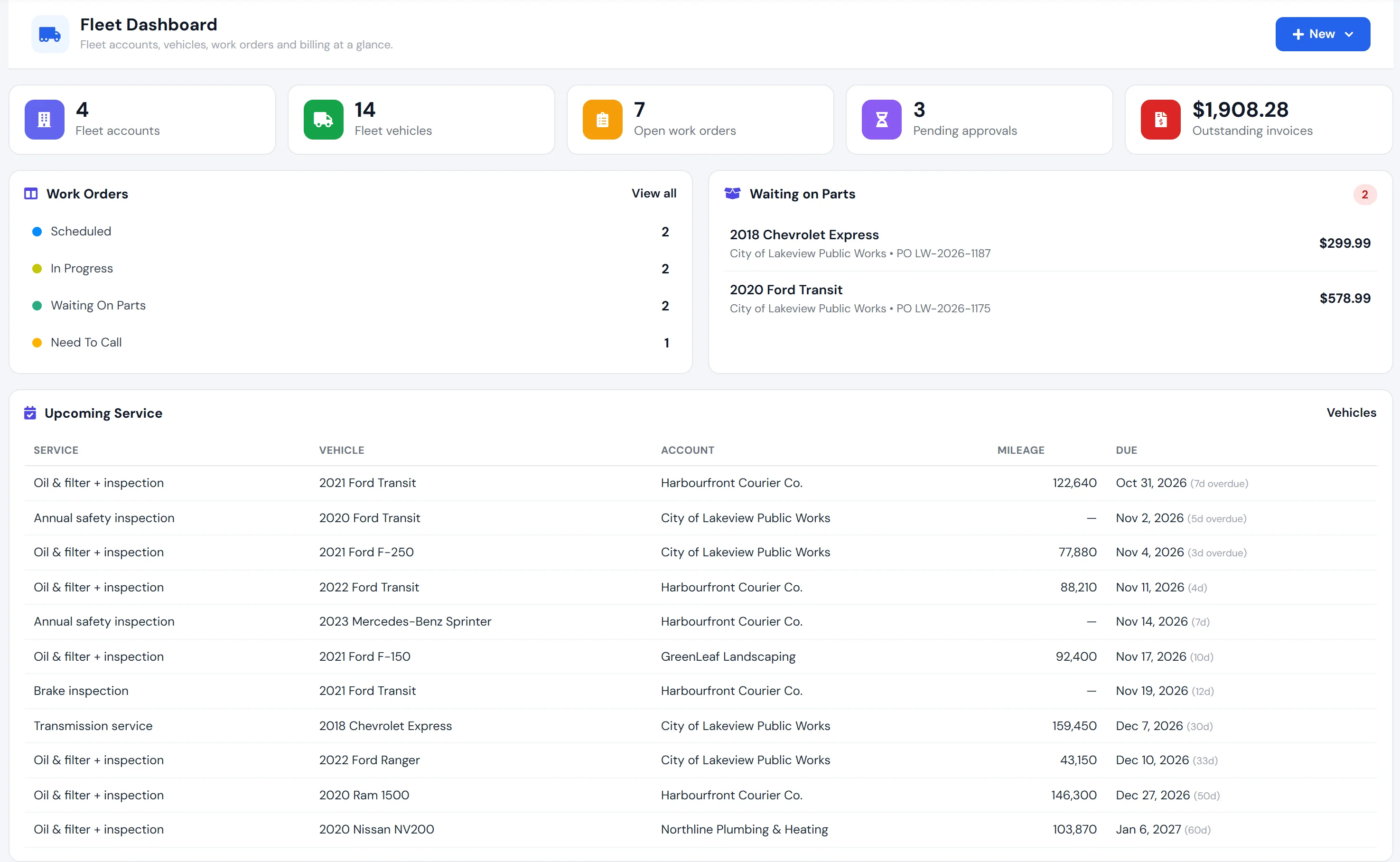
An add-on for your AutoSoftWay plan
Fleet Management works inside AutoSoftWay, the shop management software — fleet jobs use the same estimates, work orders, technicians and invoices as the rest of your shop.
Turn it on from Add-ons in the top bar. Shops without it still see the Fleet menu with a lock and a free-trial offer.
Try it free for 3 days
Start the trial yourself from the Add-ons menu — no credit card needed. It switches off on its own when the 3 days are up.
Included in Enterprise
On the Enterprise plan Fleet Management is already included — nothing extra to add.
Everything a fleet account needs from your shop
-
Fleet accounts
Commercial or government accounts with an account code, contacts, billing contact, payment terms and notes.
-
PO and approval rules
Require a PO number or an approval before a fleet job can be invoiced — set once per account.
-
Terms, tax and rates
Net 15/30/45 or due on receipt sets the due date; tax-exempt accounts bill at 0%; a default labor rate per account.
-
Drivers and departments
Drivers with licence details and assigned vehicles, and departments you pick on every work order.
-
Fleet vehicles
Unit #, asset #, type, location and In Service / Maintenance / Out of Service status for every vehicle.
-
CSV import
Add a whole fleet at once — type rows or upload a CSV from the template, with per-row errors and duplicate VINs skipped.
-
PM schedules
Preventive maintenance by months and/or kilometres, with overdue and due-soon status and a daily reminder digest.
-
Approval link for the fleet manager
Email the fleet contact a link to approve or reject the work order — no login needed.
-
Fleet reports
Spend, repair-cost trend, spend by account and the vehicles that cost the most.
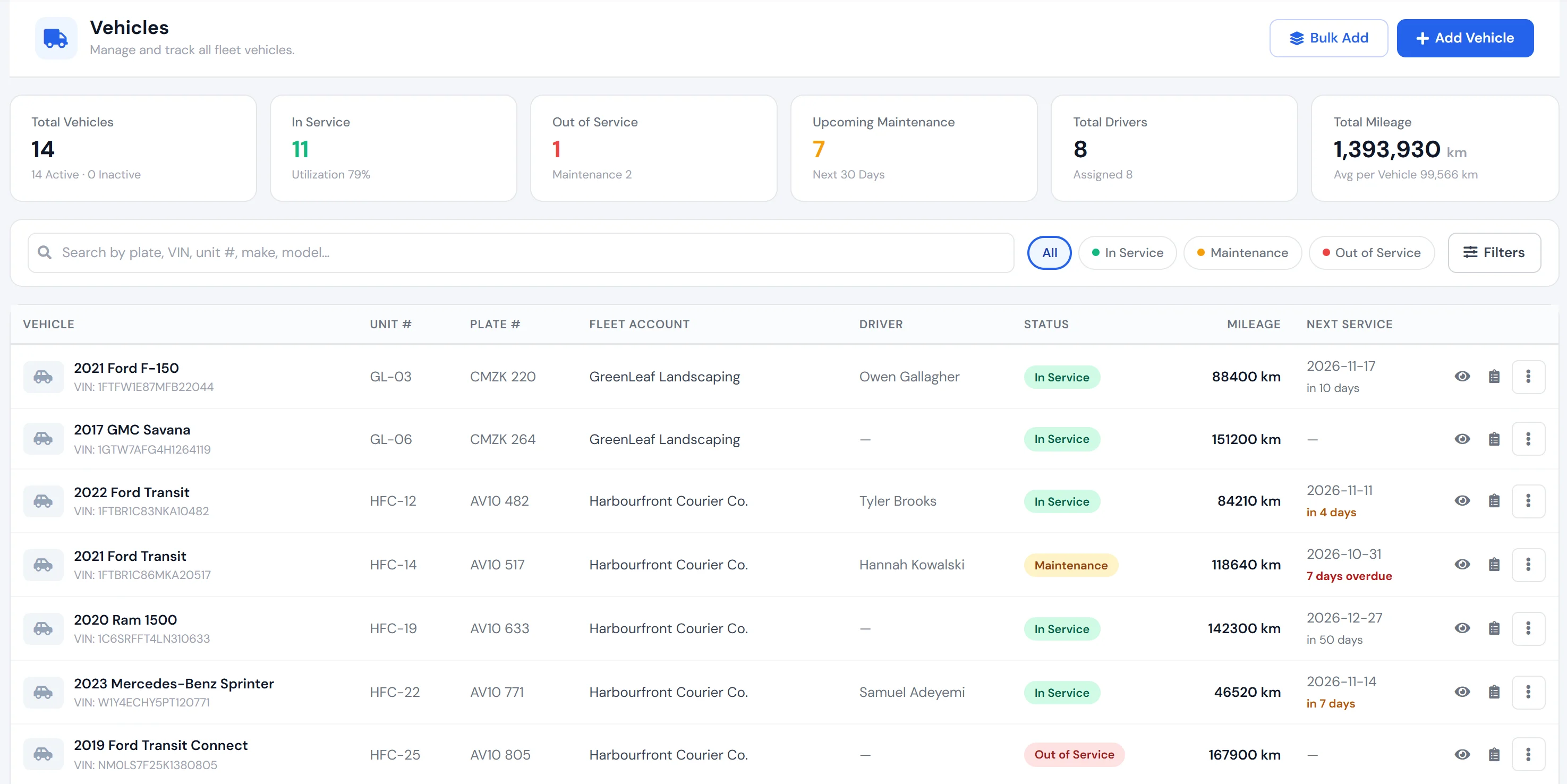
Vehicles & drivers
Every unit, its driver and its status
Each fleet vehicle carries the details a fleet manager asks about: unit #, asset #, department, driver, location and status. Filter by In Service, Maintenance or Out of Service, and add a new customer’s whole fleet from a CSV.
- Unit #, asset #, vehicle type and location
- Driver assignment with history
- Bulk add or CSV import
Preventive maintenance
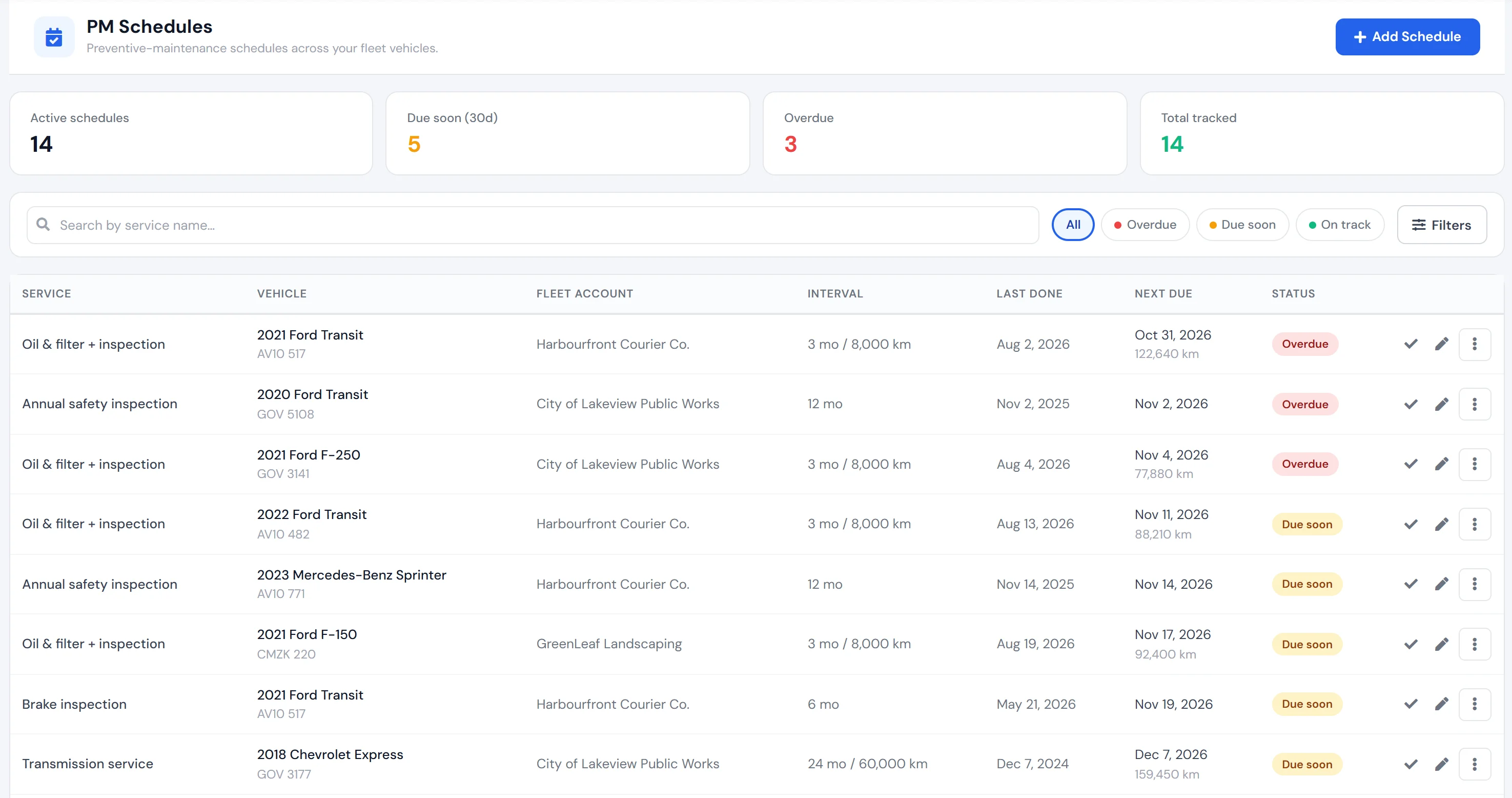
PM schedules that tell you what is due
Set a service and its interval in months, kilometres or both. AutoSoftWay tracks the last service and the next due date, flags what is overdue or due soon, and works out the next due date when you mark a service complete.
- Intervals by months and/or kilometres
- Overdue, due soon and on track at a glance
- Daily email and in-app reminder to the shop owner
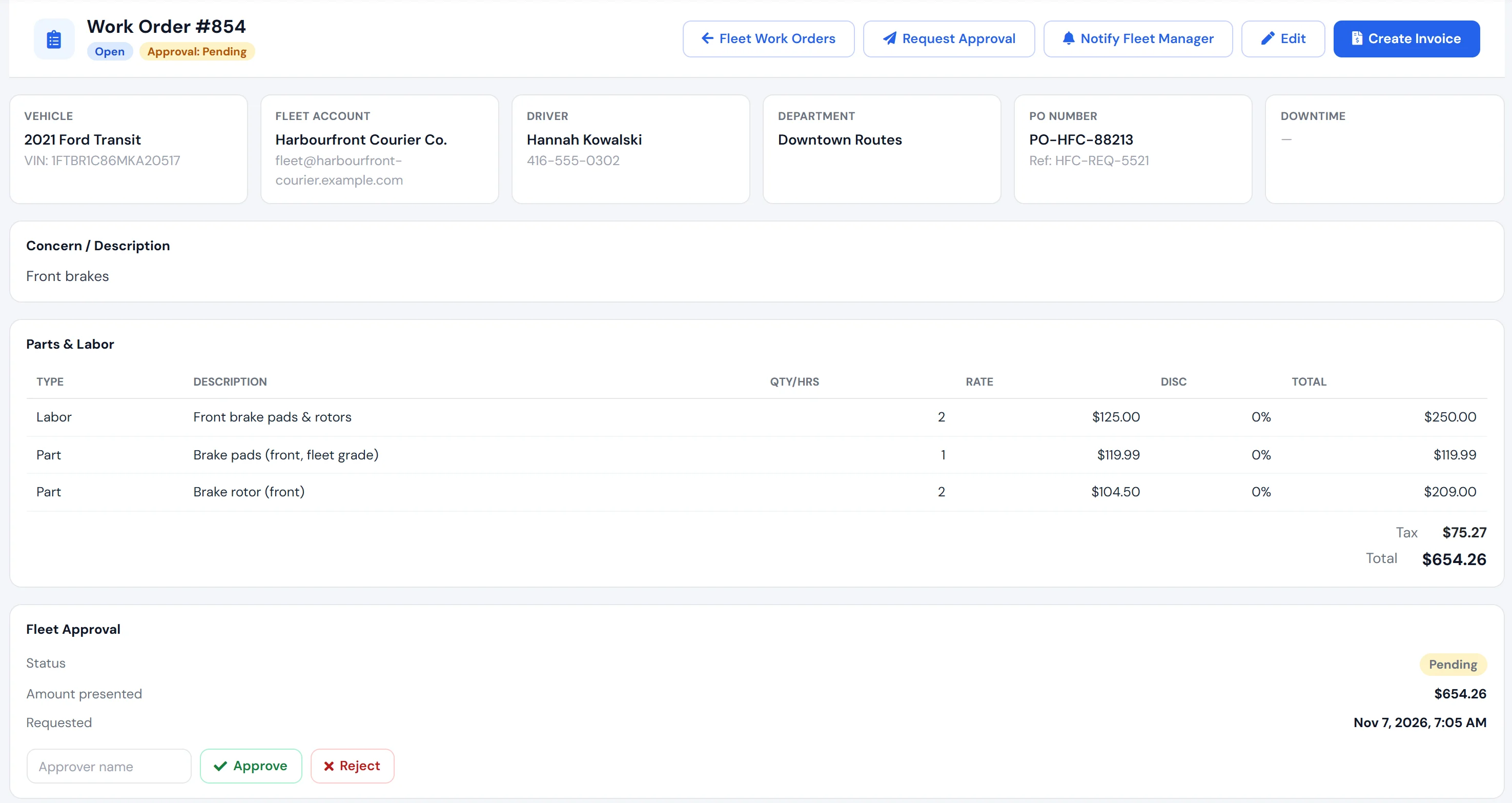
Fleet work orders
PO, driver and department on every job
A fleet work order is a normal AutoSoftWay order with the fleet details attached: driver, department, PO number and the fleet’s own reference. When the account requires approval, the job waits for it — and so does the invoice.
- PO number and fleet reference #
- Request approval or notify the fleet manager
- Invoicing blocked until the PO or approval is in
Approvals
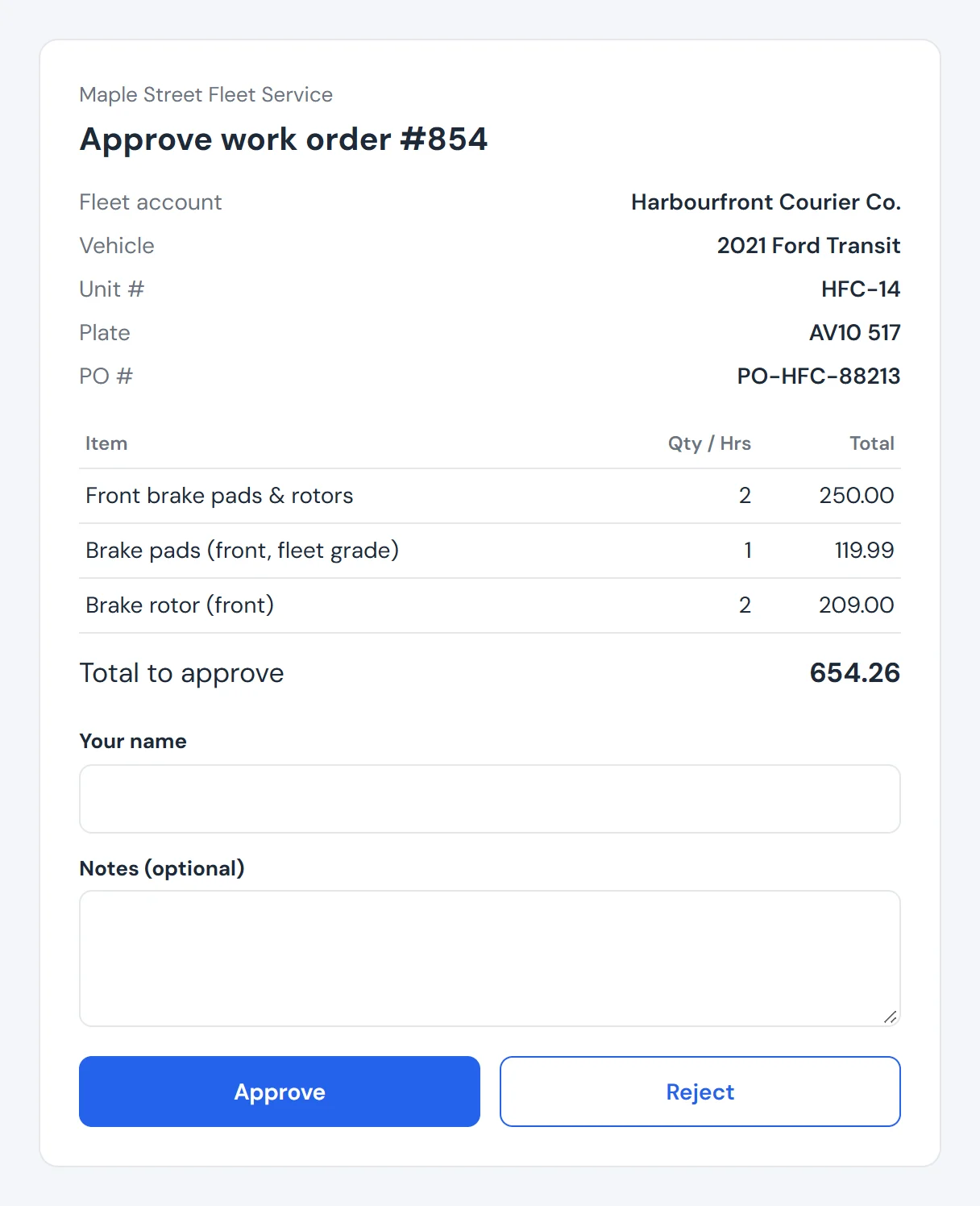
The fleet manager approves from a link
Send the request and the fleet contact gets an email with the vehicle, PO and total, and a link to review every labor and part line. They type their name, add a note if they want, and approve or reject — no account to create.
- No login for the fleet manager
- Their name and decision recorded on the job
- The link works once and expires after 30 days
Billing
Fleet invoices and what is still owed
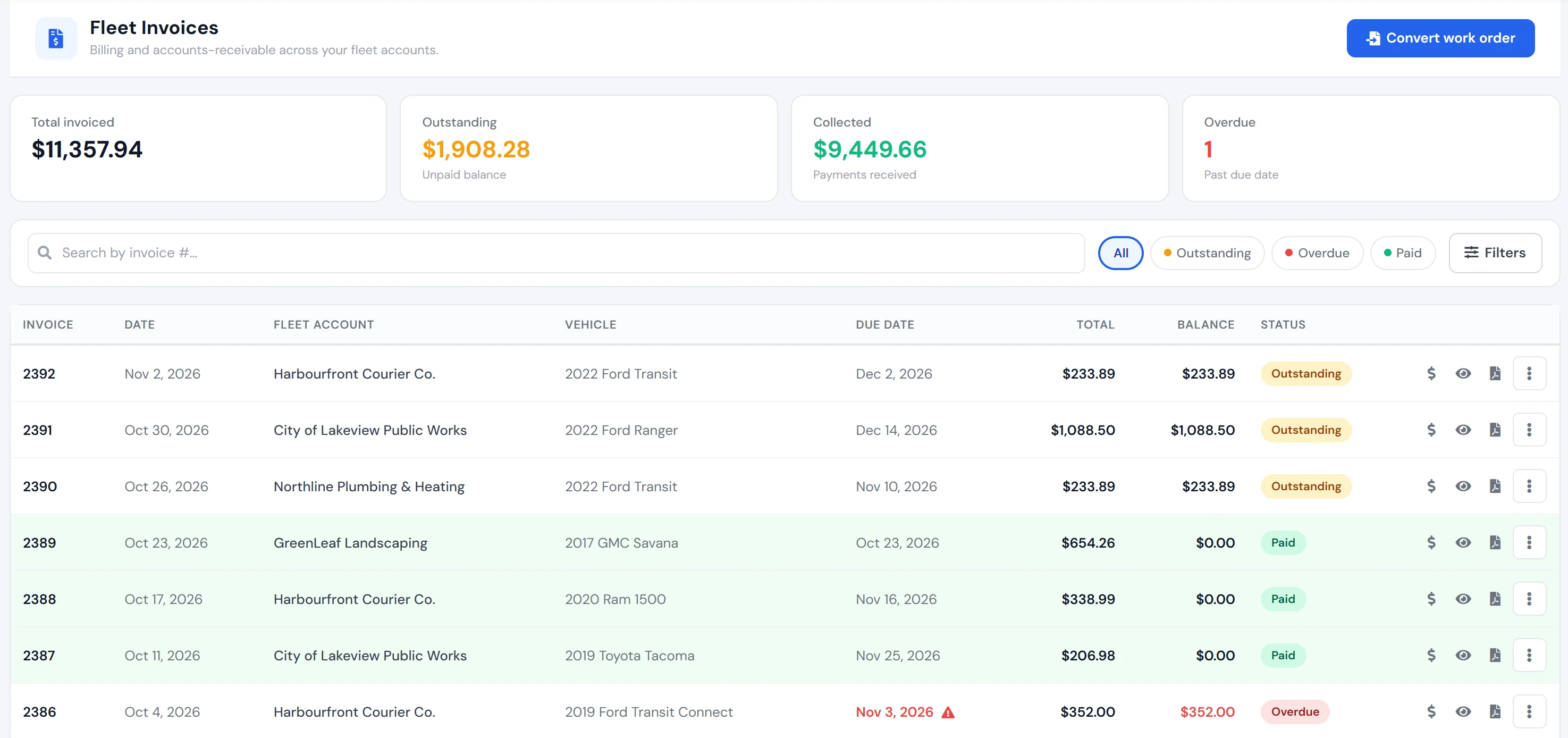
See every fleet invoice with its due date from the account’s payment terms, what is outstanding and what is overdue. Turn finished work orders into invoices and record payments. Fleet details — PO #, account #, unit #, driver and department — print on the invoice.
- Due dates from the account’s payment terms
- Outstanding, collected and overdue totals
- Fleet details on the invoice PDF
Reports
Show each fleet what you did for them
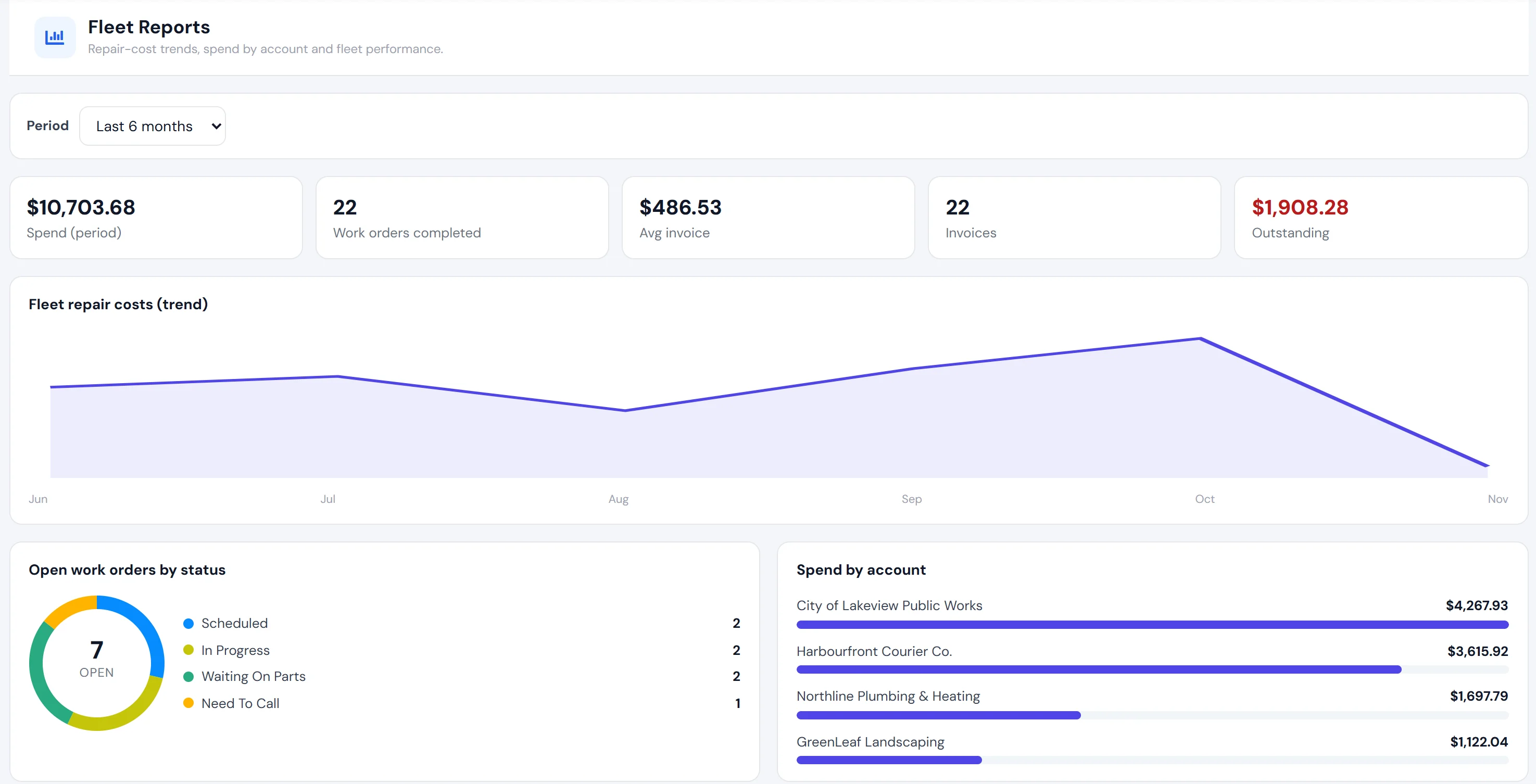
Fleet reports cover spend, completed work orders, average invoice and outstanding balance for the period, with a monthly repair-cost trend, spend by account and the vehicles that cost the most to keep on the road.
- Spend and repair-cost trend by month
- Spend by fleet account
- Top vehicles by repair cost
Get started
Bring your fleet accounts into AutoSoftWay
- 1
Use AutoSoftWay
Fleet Management is an add-on for the AutoSoftWay shop software. Start a free trial of AutoSoftWay if you are new.
- 2
Turn on Fleet Management
Open Add-ons in the top bar and start the 3-day free trial, or add it to your plan. On Enterprise it is included.
- 3
Add your fleets
Create a fleet account, or convert an existing client — their vehicles, orders and invoices come with them. Then import the vehicles.
Questions
What is the Fleet Management add-on?
An add-on for AutoSoftWay, the auto repair shop management software, for shops that service fleet accounts. It adds fleet accounts, drivers, departments, fleet vehicles, PM schedules, fleet work orders with PO and approval rules, fleet invoices and reports.
Can I try it before I pay?
Yes. Start a 3-day free trial from the Add-ons menu in AutoSoftWay. No credit card is needed for the trial.
Is it included in my plan?
Fleet Management is included in the Enterprise plan. On other plans it is a paid add-on — see the add-on price in the app, or compare the plans.
Does the fleet manager need an AutoSoftWay login to approve work?
No. They get an email with a link to the work order. They see the vehicle, PO and every labor and part line, type their name and approve or reject. The link works once, only while the total is unchanged, and expires after 30 days.
Can I block invoicing until we have a PO number?
Yes. Turn on “PO required” for the fleet account and a fleet job cannot be invoiced until a PO number is entered. “Approval required” works the same way for approvals.
Who gets the PM reminders?
The shop owner gets a daily email digest and an in-app notification when a PM service comes due within the next 7 days and again when it becomes overdue. Reminders follow the due date; nothing is sent to the fleet customer or driver.
Can I import our fleet customers’ vehicles?
Yes. Type rows into the bulk add form or upload a CSV from the template (year, make, model, VIN, plate, odometer, account, unit #, type, status, driver, department). VINs that already exist are skipped, and errors are shown per row.
I already have the fleet as a normal client. Do I start over?
No. Use Convert client to fleet: it shows how many vehicles, orders and invoices will move, then converts them all at once.
Is it in the mobile app?
Fleet Management is used in AutoSoftWay on the web. Fleet work orders are regular work orders, so your technicians work them as usual.
Want the bigger picture? Read fleet invoicing for auto repair shops or see AutoSoftWay for fleet service shops.